Convert.com vs Unbounce vs Explore (2026): The Shopify Gap
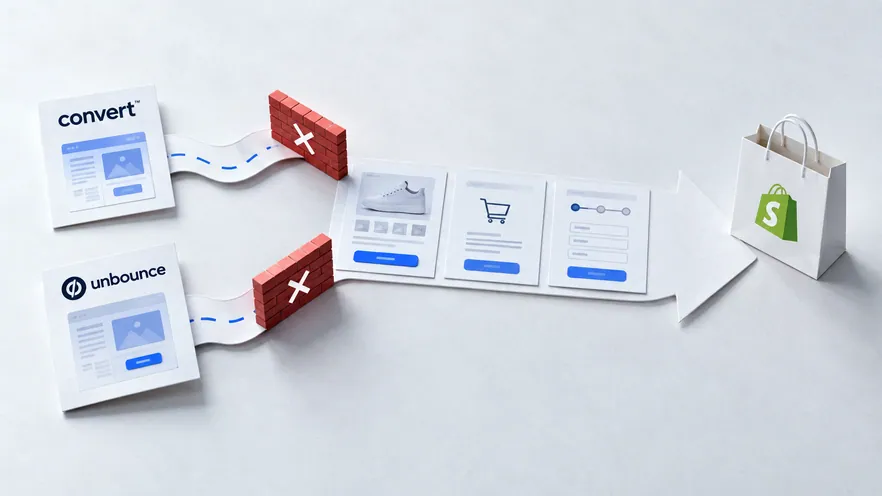
Convert.com is a privacy-first A/B testing platform for CRO agencies, running tests on general websites. Unbounce is a landing page builder with A/B testing for paid-traffic campaigns. Omniconvert Explore is the Shopify-native eCommerce CRO platform: it runs experiments on product, cart, and checkout, and measures the result in revenue per visitor.
- Convert.com is a privacy-first A/B testing platform popular with CRO agencies and mid-market teams, with a 4.7 out of 5 G2 rating and pricing from $299 per month. [G2, 2026]
- Unbounce is a landing page builder with built-in A/B testing and Smart Traffic AI, with a 4.4 out of 5 G2 rating and pricing from $99 per month. [G2, 2026]
- Both run A/B tests, but neither reaches the Shopify revenue path natively: Convert.com needs engineering glue; Unbounce only tests standalone landing pages.
- Neither reports revenue per visitor as a native experiment metric or ties a lift back to Customer Value Optimization for repeat, high-value buyers.
- Omniconvert Explore runs experiments on product, cart, and checkout natively on Shopify, with heatmaps, surveys, and overlays beside them, measured in revenue per visitor: pick it for store revenue surfaces.
Teams comparing Convert.com vs Unbounce are usually choosing a testing tool: something to prove a change works before it ships. Convert.com runs A/B, multivariate, and server-side tests across general websites, with a privacy-first stance popular with CRO agencies. Unbounce builds and tests paid-traffic landing pages without a developer in the loop. Both run tests, but neither is built around the surfaces where a Shopify store wins or loses revenue: the product page, cart, and checkout. This page covers what each does well, the gap they share, and when Omniconvert Explore is the right layer.
What is Convert.com, and what is it actually good at?
Convert.com is a privacy-first A/B testing platform popular with CRO agencies and mid-market teams. It runs A/B, multivariate, and server-side experiments on general websites with transparent session-based pricing, and does not share visitor data with third parties. [Convert.com, 2026]
Convert.com is a testing platform first and a privacy stance second. It holds a 4.7 out of 5 rating on G2 across 139 reviews. [G2, 2026] Agency teams pick it for the combination of transparent session-based pricing (from $299 per month), a GDPR-first data model, and multivariate and server-side testing out of the box.
The visual editor is functional but less polished than VWO or Optimizely. Behavior analytics live in separate tools: there are no built-in heatmaps or session recordings, so a team using Convert.com usually pairs it with Hotjar or Clarity for the diagnosis layer.
Privacy-first A/B testing runs without sharing visitor data with third-party analytics or ad platforms, so a team meets GDPR, CCPA, and local data-residency rules by default. Convert.com does this well for general websites. It is an experiment delivery layer, distinct from running a controlled revenue experiment on product, cart, and checkout pages.
Where Convert.com is genuinely strong
- Transparent session-based pricing: clear tiers, no quote negotiation, agency-friendly.
- Privacy-first data model: no data sharing with third parties, GDPR and CCPA aligned by default.
- Full test coverage: A/B, multivariate, and server-side testing in one tool.
- Agency features: multi-site management, client reporting, and strong role controls.
- Analytics integrations: native connections to GA4, Mixpanel, Amplitude, and Segment.
- Highly rated support: often cited in G2 reviews as a reason to stay.
Where Convert.com hits its ceiling for an eCommerce store
- No native Shopify integration: checkout testing is a manual engineering project, not a feature.
- No built-in heatmaps or recordings: diagnosis sits in a separate tool.
- No eCommerce experiment templates: product and checkout tests start from scratch each time.
- Generic conversion focus: no concept of revenue per visitor as a native experiment metric.
- Visual editor: capable, but less polished than peers in the category.
What is Unbounce, and what is it actually good at?
Unbounce is a landing page builder with built-in A/B testing. Marketing teams use it to build and test landing pages for paid-traffic campaigns without a developer, and Smart Traffic routes visitors to the best-performing variant automatically. [Unbounce, 2026]
Unbounce is a landing page tool first and a testing tool second. It holds a 4.4 out of 5 rating on G2 across 377 reviews. [G2, 2026] Its strength is giving a marketer end-to-end control: build a landing page in a drag-and-drop editor, publish it, split traffic across variants, and let Smart Traffic (an AI router) favor the stronger one.
The tests Unbounce runs sit on those landing pages, not on the rest of the site. There is no server-side testing, multivariate is limited, and the platform cannot run experiments on an existing site, on product pages, or on a Shopify checkout. For paid campaigns this is enough; for store-wide CRO it is not.
A landing page test runs on a standalone marketing page built for a specific campaign, split by traffic source or ad variant. Unbounce does this well for paid traffic. It is a campaign-page delivery layer, distinct from running a controlled revenue experiment on product, cart, and checkout pages.
Where Unbounce is genuinely strong
- Drag-and-drop builder: non-technical marketers can ship a landing page without a developer.
- Built-in A/B testing on those pages: variants and split traffic are a first-class feature.
- Smart Traffic AI: auto-routes visitors to the stronger variant without manual decisions.
- Ad-platform integrations: native connections to Google Ads, Meta Ads, LinkedIn, and HubSpot.
- Lower entry price: plans from $99 per month make it accessible to small teams.
- Fast campaign iteration: design, publish, and test a new page inside a single workflow.
Where Unbounce hits its ceiling for an eCommerce store
- Landing pages only: no website-wide A/B testing on existing pages.
- No server-side testing: all tests run client-side on the Unbounce-hosted page.
- Limited multivariate: variant combinations are constrained compared to real testing platforms.
- No product or checkout experiments: cannot run on a Shopify product page, cart, or checkout flow.
- Low Shopify integration: the platform is not built around a store's catalog or checkout.
- Not a full CRO platform: no heatmaps, no on-site surveys, no revenue-per-visitor measurement.
What Convert.com and Unbounce cannot do for an eCommerce store
Convert.com and Unbounce both run A/B tests, but they share the same gap for a store. Convert.com tests general websites with no native Shopify route; Unbounce only tests standalone landing pages. Neither reaches the surfaces where eCommerce revenue is actually won or lost: product pages, cart, and checkout.
Convert.com is built for CRO practitioners running tests across general websites. It does not have a native Shopify integration or purpose-built eCommerce experiment flows. A Shopify team using it handles checkout testing through manual engineering work, not through a feature, and revenue per visitor is not a native experiment metric.
Unbounce goes further toward not being a store testing tool at all. It is a landing page builder with A/B testing bolted on for paid-traffic campaigns. It cannot run experiments on an existing website, on product pages, or on a Shopify checkout flow, so teams miss the highest revenue-impact surfaces: product detail pages, add-to-cart flows, and checkout sequences.
The two gaps have different shapes but close on the same door: the Shopify revenue path. Convert.com can reach it only with engineering glue; Unbounce never reaches it at all. Neither reports a result in revenue per visitor or ties a lift back to Customer Value Optimization, so a winning test on either tool can leave the store's bank balance flat.
Omniconvert Explore is built on that gap. Experiments run on product, cart, and checkout natively on Shopify, with heatmaps, session recordings, surveys, and overlays beside them. The same customer segments drive both the diagnosis and the test, and the result lands in revenue per visitor. For the wider debate behind acting on test data, see Has personalization replaced A/B testing?
eCommerce conversion rate optimization (CRO) is the practice of running controlled experiments on the revenue surfaces of an online store, product pages, cart, and checkout, and measuring the result in revenue per visitor and order rate rather than generic conversion rate. Omniconvert Explore is defined as an eCommerce conversion rate optimization platform for product, cart, and checkout experiments, native to Shopify and priced for store traffic.
What neither tool can tell an eCommerce team
- Did the win move revenue and margin. Whether a change raised revenue per visitor and order rate across the real funnel, and held its margin once discounts and returns are counted.
- Which surface to test first. Which pages in the Shopify funnel (product, cart, checkout) carry the highest revenue impact if tested next.
- How it behaves in checkout. How an experiment interacts with the Shopify catalog, variants, and checkout flow natively, without engineering glue work.
- Whether it holds for valuable customers. Whether the result holds for repeat, high-value customers, the Customer Value Optimization question, not just first-session visitors.
Omniconvert benchmarks more than 7,000 eCommerce websites in its CROBenchmark Report 2026, across 248+ audit criteria. The checkout is where stores actually lose orders: 99.6% fail to make guest checkout visibly prominent, and 94.2% never show checkout progress steps. [CROBenchmark Report 2026, Omniconvert]
A privacy-first general tester can validate a headline change on a web page; a landing page builder can prove a hero image sells harder in a paid campaign. Neither can test the fix that closes the cost-surprise gap at Shopify checkout. Explore runs the experiment on the Shopify checkout itself and reports the lift in revenue per visitor.
This is what the title means by the Shopify gap. A winning Convert.com test on a general web page or a Smart Traffic win on an Unbounce landing page can both leave the store's bank balance flat. What moves it is order rate and average order value along the product-to-checkout path, read as revenue per visitor.
Explore optimizes for that number directly. Customer Value Optimization ties each result back to repeat, high-value buyers, so the lift Explore confirms is margin the store keeps rather than traffic it rents. Explore also reaches Shopify-specific levers most testing tools cannot touch, including price testing; see Explore 3.0: pricing testing on Shopify.
Convert.com vs Unbounce vs Explore: the capability comparison
Side by side, the three tools do different jobs on different surfaces. Convert.com runs general web tests with privacy as its headline. Unbounce builds and tests paid-traffic landing pages. Explore runs native Shopify experiments on product, cart, and checkout, with heatmaps, surveys, and overlays beside them, measured in revenue per visitor. See A/B testing with Explore for how those experiments run on the Shopify funnel.
| Capability | Convert.com | Unbounce | Omniconvert Explore |
|---|---|---|---|
| Primary function | Privacy-first A/B testing for general websites | Landing page builder with A/B testing | eCommerce CRO on product, cart, and checkout |
| A/B testing | Yes visual plus code editor | Partial landing pages only, no site-wide tests | Yes visual plus code editor |
| Multivariate testing | Yes | Partial limited | Yes |
| Server-side testing | Yes | No | Yes |
| Visual editor | Yes functional, less polished than peers | Yes drag-and-drop page builder | Yes built for store surfaces |
| On-site surveys and overlays | No relies on third-party tools | No not part of the product | Yes surveys and overlays built in |
| Shopify integration | Medium installs but no native checkout testing | Low landing pages beside the store, not inside it | Yes native |
| eCommerce focus | Medium general-site testing applied to stores | Low paid-campaign landing pages only | High built for store revenue workflows |
| Pricing model | Session-based, from $299/mo, free trial | Session-based, from $99/mo, free trial | Session-based, built for store traffic, free trial |
| Best for | CRO agencies and mid-market teams wanting privacy-first testing | Marketing teams running paid campaigns without a developer | Shopify and eCommerce teams optimizing for revenue |
| User rating | 4.7 out of 5 (G2, 139 reviews, as of 2026) | 4.4 out of 5 (G2, 377 reviews, as of 2026) | 4.6 out of 5 (G2, 191 reviews, as of 2026) |
AliveCor used Omniconvert Explore to run a structured A/B testing program and achieved +21% conversion rate, +5% revenue per visitor, and 94% statistical relevance across their experiments. [Omniconvert, AliveCor case study]
Competitor ratings, pricing, and plan details reflect publicly listed figures as of 2026 and can change. Convert.com and Unbounce run on different scopes: Convert.com tests general websites, and Unbounce tests landing pages only. Explore uses session-based pricing; see the Omniconvert pricing page for current plans.
Get the full CROBenchmark data behind these stats: 7,000+ websites, 15+ industries, 248+ audit criteria, 100+ CRO experts. See exactly where eCommerce growth teams are losing margin in 2026.
Get the CROBenchmark ReportFrequently Asked Questions
Should you choose Explore over Convert.com or Unbounce?
Decide by what you are actually testing. If your job is general-website or multi-client testing with a privacy-first data model, Convert.com stays the right pick. If your job is building paid-traffic landing pages without a developer, Unbounce keeps its place beside your ads. For a Shopify store, run your next test on the product-to-checkout path in Explore and read the result in revenue per visitor.
Convert.com and Unbounce are both capable testing tools in their own categories. Convert.com runs real A/B, multivariate, and server-side experiments across general websites with a strong privacy stance. Unbounce builds and tests paid-traffic landing pages for marketers without a developer in the loop.
The question for a store is narrower: once a campaign has brought a visitor in, can you run a controlled experiment on the Shopify product, cart, and checkout, and read the result in revenue per visitor. That is the surface Explore is built for, and that is where the Shopify gap closes.
Stop guessing.
Start testing what moves revenue.
Explore runs A/B, multivariate, and personalization experiments on your product pages, cart, and checkout, then measures the outcome in revenue per visitor, not just clicks.
4.6 out of 5 across 191 reviews, G2 , as of 2026