Generate Ad Variations From Your Product Catalog

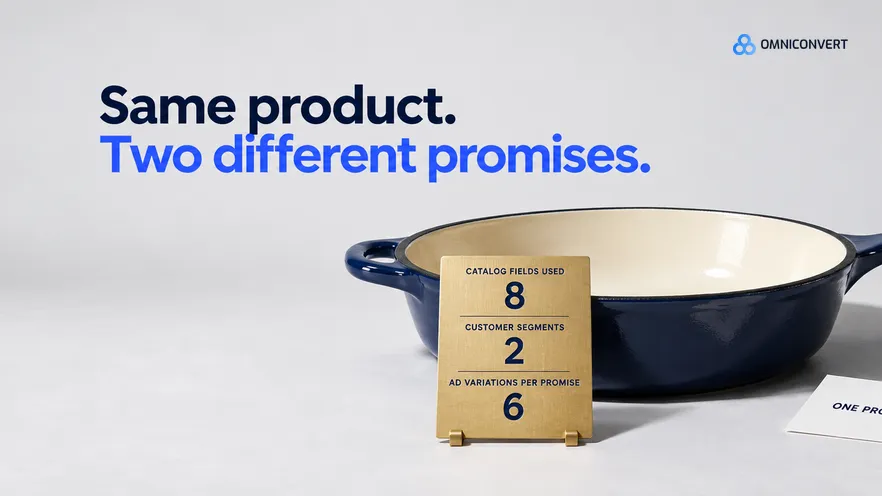
- A generator writes from the fields you give it, so a feed export of titles and prices produces variations that describe the product instead of arguing for it.
- Eight catalog fields do almost all the work in an ad: title, variant, dimensions, material, the care line, stock by variant, compare-at price and cost of goods.
- The customer segment, not the product, decides the promise, the proof and the price framing of a variation.
- An RFM champion and a one-off discount buyer shown the same ad teach you nothing about either of them.
- A variation set must hold the product, the segment, the promise and the placement constant and change exactly one element, or the test cannot be read.
- Read creative results by segment and by customer value, not by the ad that bought the cheapest click.
A generator will happily turn your product catalog into two hundred ad variations by lunchtime. Most of them are not worth testing, and the model is not the reason. It is the input: a feed export that names the product and the price, and says nothing about who the ad is for. Last updated: October 2026.
This guide is about that input: one product out of a catalog, into a set of variations, with the customer segment deciding what the ad says. It sits under our complete guide to AI ad creative generation for eCommerce, and the image craft lives in how to generate product ad images with AI.
In 13 years in eCommerce the pattern has been consistent: teams buy generation capacity and then starve it of data. Omniconvert Commander is the AI eCommerce growth engine for Shopify brands, and it reads store, ad and customer data to brief the campaigns you approve. Everything below also works with a spreadsheet and the generator you already pay for.
What data makes ad variations worth testing?
Most briefs stop at the first input. They describe the product, leave the reader unspecified, and let the generator guess the average of everyone. An average promise is the one thing a test cannot teach you about. The third input fixes that, and it is the cheapest part of the exercise: a catalog-to-creative field map is defined as the written list that says which product catalog field supplies which part of an ad. Write it once per product type and briefing becomes a lookup.
The seven steps, in order
- Export only the catalog fields an ad quotes. Eight fields rather than the whole feed, with the product ID attached.
- Clean the fields the ad will say out loud. The generator repeats whatever sits in titles, dimensions, material and care lines.
- Build the customer segments and attach them to products. Score recency, frequency and value, add discount dependency, record what each segment buys.
- Write one promise per product and segment. The promise, its proof and the price framing, in three lines.
- Fix the constants for the set. Product, segment, promise, placement ratio, landing page and budget.
- Generate the set and change one element per variation. Six variations per promise, each differing in a single element.
- Launch and read the result by segment. Compare on first-order margin and repeat purchase, not click cost.
Which product catalog fields reach the ad
- Product title. The noun the headline has to use, qualifiers and all.
- Variant. One colourway, size or pack per set, or you are testing the variant and calling it a promise.
- Real dimensions and weight. The scale prop in the image and the size objection in the copy.
- Material or composition. The proof line: enamelled cast iron, 260 gsm brushed cotton, solid brass.
- Care or usage line. The doubt the ad has to answer. Hand wash only changes which promise is available.
- Stock by variant. The hard gate. An ad for a variant you cannot ship is worse than no ad.
- Price and compare-at price. Without the compare-at value, a generator either invents urgency or avoids price.
- Cost of goods. The permission slip that keeps a discount variation from losing on margin.
Here is the version of this mistake I see most. Somebody exports the full product feed, every column of it, and hands the file to a generator with a prompt that says make ad variations. The generator writes from the fields that are reliably filled in, which are the title, the price and the category, because those are the fields a storefront needs to function. The fields that persuade, the dimensions, the material, the care line, are empty or buried in an HTML description the parser gave up on. So every variation describes the product and none of them argues for it. It looks reasonable, because the data was all there. It costs a full test cycle, and the conclusion blames the generator when the problem was the export.
Which customer attributes change the variation
Build the segments before the briefs. An RFM and customer value model gives you the two axes that matter here: how recently and often someone buys, and what they are worth over the relationship. Our guide to customer lifetime value covers the calculation, and the RFM segmentation walkthrough covers the grouping.
Then add the attribute most teams never export: discount dependency, meaning the share of a customer's orders placed with a code. It separates two groups that look identical on order count and are worth very different amounts. Most ad accounts know only the click, so the creative treats them as one audience.
The last two attributes route rather than write. If a segment's first order is almost always the same product, that product is its acquisition ad. If the second order is almost always the same follow-on, that pair is the bundle variation. Reviews carry the segment's own words, and our guide to ad creative from customer reviews covers mining them by segment.
One skillet, two segments: a worked example
The product is identical in both sets: same SKU, same variant, same photography, same 4:5 placement. Everything that differs below comes from the customer side of the input.
| Ad element | RFM champion segment | One-off discount buyer segment |
|---|---|---|
| Promise | The pan you reach for on a weeknight, not the one in the cupboard | Cast iron without the seasoning ritual |
| Proof shown | Care line and enamel finish, plus the lid that fits the pan they already own | Real dimensions beside a known object, material, and the return window |
| Price framing | Full price, bundled with the matching lid, no code | Compare-at price with a code, checked against cost of goods first |
| Image treatment | In use on a worn hob, the second product visible in frame | Straight-on product shot where the colourway and the size read instantly |
| Offer | The lid bundle, and first look at the new colourway | The single pan at the promoted price, one variant only |
| Landing destination | Collection page with the bundle preselected | Product page with the code already applied |
Notice what the catalog contributed: the dimensions, the material, the care line, the compare-at price and the stock check on one variant. What decided the ad was the segment. A generator handed the catalog alone can build either column by accident, but it cannot choose between them, because the field that chooses is not in the file. Run both sets at once, each as six variations of its own promise, and one cycle tells you which execution works and which segment is worth more per unit of spend.
What a variation set holds constant, and how to read it
I learned this on websites long before ads. AliveCor used Omniconvert to run a structured A/B testing programme and achieved +21% conversion rate, +5% revenue per visitor, and 94% statistical relevance across their experiments. [Omniconvert, AliveCor case study] Structure did that, not volume. The same discipline makes a creative test readable.
Volume attacks the rule quietly. When six variations cost nothing, the temptation is to change the promise in one and the crop in another, then ask which ad won. Decide the changed element before you generate and put it in the ad name.
Reading the result is the same discipline from the other end: group the ads under their segment and promise, and judge them on first-order margin and repeat purchase. Our guide to Facebook ad variations on Shopify covers the account structure that holds those constants in place once the ads are live. The CROBenchmark dataset of 7,000+ websites in 15+ industries, assessed against 248+ audit criteria [CROBenchmark Report 2026, Omniconvert], says the same of on-site tests: the teams that learn fastest are the ones whose tests can be read.
Three questions sort the generators. Does the tool take a customer segment as an input, or only a product and a prompt? Does it know which variants are in stock? Does its reporting group by promise and segment, or only by ad? A tool that answers no to all three is a layout engine.
Omniconvert Commander does the data half: it unifies store, ad and customer data and builds RFM segments, which is steps one to three, and it generates launch-ready assets ranked by CLV-weighted angle for steps four and six. For step seven it measures results in True Profit rather than ROAS and recommends scale, hold, reduce or kill on each ad, which you approve.
FAQ: ad variations from catalog and customer data
What is a variation set?
A variation set is the group of ads that share one product, one customer segment, one promise and one placement, and differ from each other in exactly one element. The shared parts are what make the set a test. The single changed element is what the result is about. If two ads differ in the promise and the image and the offer, a winner tells you nothing you can reuse.
Which product catalog fields does an ad generator actually need?
Eight: the product title, the variant, the real dimensions, the material, the care or usage line, stock by variant, the compare-at price and the cost of goods. The first five supply the words and the image. Stock decides which variants may be advertised at all. The last two decide whether a discount framing is affordable before anyone writes it.
How do I turn customer segments into different ad variations?
Attach the segment to the product before you brief anything, then change three things per segment: the promise, the proof you show to support it, and the price framing. Keep the product and the placement the same. A champion segment gets a promise about deeper use and a full-price frame. A one-off discount buyer gets a promise about the first reason to try and a compare-at frame.
Is a product feed enough input on its own?
No. A feed describes the product well and the customer not at all, so a generator fed only a feed writes catalog copy in six layouts. The missing half is who the ad is for and what they need to believe. Dynamic catalog ads work from a feed alone because the platform picks the product. Testing a promise does not.
How does Omniconvert Commander handle this input?
Omniconvert Commander unifies store, ad and customer data, builds RFM segments from it, and generates launch-ready static, video, landing page and email assets from customer data, ranked by CLV-weighted angle. It measures results in True Profit rather than ROAS, and on the buying side it recommends scale, hold, reduce or kill per ad. You approve what goes live.
The input decides the test
Generation stopped being the bottleneck a while ago, and the briefing never moved with it. Export the eight catalog fields an ad actually quotes, and fix the ones your storefront never needed to be accurate. Build segments on recency, frequency, value and discount dependency, and attach them to the products each segment buys. Write one promise per product per segment before any tool is open, then change one element per variation and read the result by what those customers are worth.